> ## Documentation Index
> Fetch the complete documentation index at: https://docs.aiohub.org/llms.txt
> Use this file to discover all available pages before exploring further.
# VS Code
> Connect AIOHub to VS Code through the Claude Code and Codex extensions.
VS Code is one of the most popular code editors. You can install the Claude Code or Codex extension to use AIOHub AI models directly in the editor for code completion, chat, and refactoring.
## Prerequisites
* [VS Code](https://code.visualstudio.com/) installed
* An [AIOHub API key](/en/account/create-token)
* Sufficient account balance
## Extension overview
The two extensions use different protocols and configurations. They do not conflict and can be installed side by side:
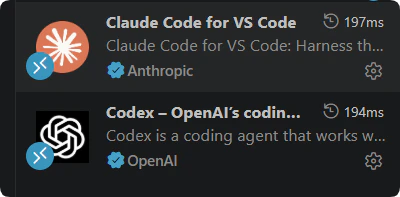 | Extension | Protocol | Base URL |
| ----------- | ---------------- | --------------------------- |
| Claude Code | Claude Messages | `https://api.aiohub.org` |
| Codex | OpenAI Responses | `https://api.aiohub.org/v1` |
Your API key must be associated with the correct group, otherwise models will be unavailable or authentication will fail. Choose the appropriate group when creating your key.
***
## Claude Code extension
[Claude Code](https://marketplace.visualstudio.com/items?itemName=anthropics.claude-code) is Anthropic's official VS Code extension, providing AI chat, code editing, and terminal capabilities.
Search for **Claude Code** in the VS Code extension marketplace, or run:
```bash theme={"system"}
code --install-extension anthropics.claude-code
```
The Claude Code extension uses the same environment variables as the Claude Code CLI. Add to `~/.zshrc` or `~/.bashrc`:
```bash theme={"system"}
export ANTHROPIC_BASE_URL="https://api.aiohub.org"
export ANTHROPIC_AUTH_TOKEN="sk-your-api-key"
```
| Extension | Protocol | Base URL |
| ----------- | ---------------- | --------------------------- |
| Claude Code | Claude Messages | `https://api.aiohub.org` |
| Codex | OpenAI Responses | `https://api.aiohub.org/v1` |
Your API key must be associated with the correct group, otherwise models will be unavailable or authentication will fail. Choose the appropriate group when creating your key.
***
## Claude Code extension
[Claude Code](https://marketplace.visualstudio.com/items?itemName=anthropics.claude-code) is Anthropic's official VS Code extension, providing AI chat, code editing, and terminal capabilities.
Search for **Claude Code** in the VS Code extension marketplace, or run:
```bash theme={"system"}
code --install-extension anthropics.claude-code
```
The Claude Code extension uses the same environment variables as the Claude Code CLI. Add to `~/.zshrc` or `~/.bashrc`:
```bash theme={"system"}
export ANTHROPIC_BASE_URL="https://api.aiohub.org"
export ANTHROPIC_AUTH_TOKEN="sk-your-api-key"
```
 Run `source ~/.bashrc` (or `source ~/.zshrc`), then restart VS Code.
`ANTHROPIC_BASE_URL` must not include `/v1`. Claude Code appends `/v1/messages` automatically.
On Windows, add system environment variables:
| Variable | Value |
| ---------------------- | ------------------------ |
| `ANTHROPIC_BASE_URL` | `https://api.aiohub.org` |
| `ANTHROPIC_AUTH_TOKEN` | `sk-your-api-key` |
You can also set terminal environment variables in VS Code `settings.json`:
```json theme={"system"}
{
"terminal.integrated.env.osx": {
"ANTHROPIC_BASE_URL": "https://api.aiohub.org",
"ANTHROPIC_AUTH_TOKEN": "sk-your-api-key"
},
"terminal.integrated.env.linux": {
"ANTHROPIC_BASE_URL": "https://api.aiohub.org",
"ANTHROPIC_AUTH_TOKEN": "sk-your-api-key"
},
"terminal.integrated.env.windows": {
"ANTHROPIC_BASE_URL": "https://api.aiohub.org",
"ANTHROPIC_AUTH_TOKEN": "sk-your-api-key"
}
}
```
Your API key's group determines which models are available and at what price. Recommended groups for Claude Code:
| Group | Notes |
| ---------------- | -------------------------------------------------- |
| `claude-bedrock` | Stable, supports prompt caching, higher price |
| `claude-kiro` | Lower price, occasional downtime, no cache support |
| `anthropic` | Standard Anthropic route |
See [Groups](/en/account/groups) for details.
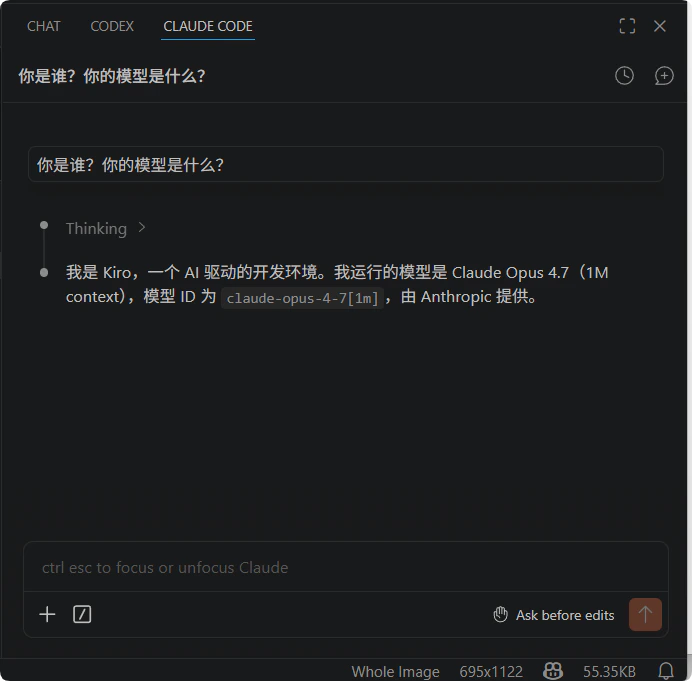
Open VS Code and send a message in the Claude Code panel. A normal response confirms the setup works:
Run `source ~/.bashrc` (or `source ~/.zshrc`), then restart VS Code.
`ANTHROPIC_BASE_URL` must not include `/v1`. Claude Code appends `/v1/messages` automatically.
On Windows, add system environment variables:
| Variable | Value |
| ---------------------- | ------------------------ |
| `ANTHROPIC_BASE_URL` | `https://api.aiohub.org` |
| `ANTHROPIC_AUTH_TOKEN` | `sk-your-api-key` |
You can also set terminal environment variables in VS Code `settings.json`:
```json theme={"system"}
{
"terminal.integrated.env.osx": {
"ANTHROPIC_BASE_URL": "https://api.aiohub.org",
"ANTHROPIC_AUTH_TOKEN": "sk-your-api-key"
},
"terminal.integrated.env.linux": {
"ANTHROPIC_BASE_URL": "https://api.aiohub.org",
"ANTHROPIC_AUTH_TOKEN": "sk-your-api-key"
},
"terminal.integrated.env.windows": {
"ANTHROPIC_BASE_URL": "https://api.aiohub.org",
"ANTHROPIC_AUTH_TOKEN": "sk-your-api-key"
}
}
```
Your API key's group determines which models are available and at what price. Recommended groups for Claude Code:
| Group | Notes |
| ---------------- | -------------------------------------------------- |
| `claude-bedrock` | Stable, supports prompt caching, higher price |
| `claude-kiro` | Lower price, occasional downtime, no cache support |
| `anthropic` | Standard Anthropic route |
See [Groups](/en/account/groups) for details.
Open VS Code and send a message in the Claude Code panel. A normal response confirms the setup works:
 ***
## Codex extension
[Codex](https://marketplace.visualstudio.com/items?itemName=openai.codex) is OpenAI's official VS Code extension for AI-assisted programming.
Search for **Codex** in the VS Code extension marketplace, or run:
```bash theme={"system"}
code --install-extension openai.codex
```
The Codex extension reads from the same `~/.codex/config.toml` as the CLI. If you already followed the [Codex CLI setup](/en/clients/codex), the extension picks it up automatically and you can skip this step.
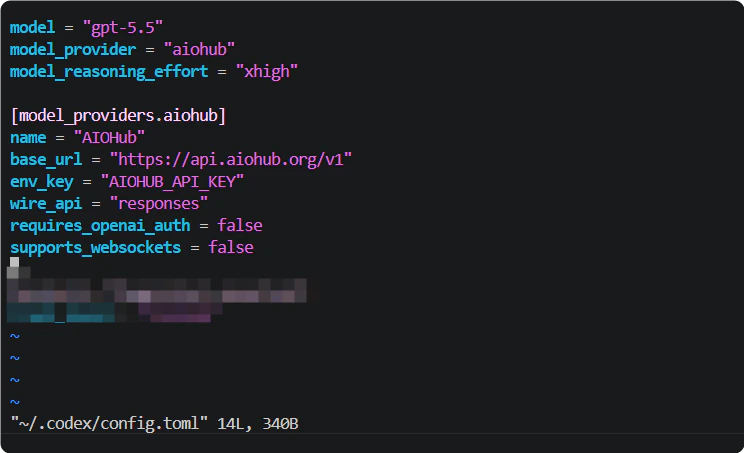
If not yet configured, create `~/.codex/config.toml`:
```toml theme={"system"}
model_provider = "aiohub"
model = "gpt-5.3-codex"
[model_providers.aiohub]
name = "AIOHub"
base_url = "https://api.aiohub.org/v1"
env_key = "AIOHUB_API_KEY"
wire_api = "responses"
requires_openai_auth = false
supports_websockets = false
```
***
## Codex extension
[Codex](https://marketplace.visualstudio.com/items?itemName=openai.codex) is OpenAI's official VS Code extension for AI-assisted programming.
Search for **Codex** in the VS Code extension marketplace, or run:
```bash theme={"system"}
code --install-extension openai.codex
```
The Codex extension reads from the same `~/.codex/config.toml` as the CLI. If you already followed the [Codex CLI setup](/en/clients/codex), the extension picks it up automatically and you can skip this step.
If not yet configured, create `~/.codex/config.toml`:
```toml theme={"system"}
model_provider = "aiohub"
model = "gpt-5.3-codex"
[model_providers.aiohub]
name = "AIOHub"
base_url = "https://api.aiohub.org/v1"
env_key = "AIOHUB_API_KEY"
wire_api = "responses"
requires_openai_auth = false
supports_websockets = false
```
 Add the API key to `~/.bashrc` or `~/.zshrc`:
```bash theme={"system"}
export AIOHUB_API_KEY="sk-your-api-key"
```
Add the API key to `~/.bashrc` or `~/.zshrc`:
```bash theme={"system"}
export AIOHUB_API_KEY="sk-your-api-key"
```
 `base_url` must include `/v1`. Codex uses the OpenAI Responses API, which differs from Claude Code's endpoint.
Your API key's group determines which models are available and at what price. Recommended groups for Codex:
| Group | Notes |
| ------------------- | ---------------------------------- |
| `codex` | Gateway relay, compatibility-first |
| `codex-passthrough` | Direct pass-through, low latency |
See [Groups](/en/account/groups) for details.
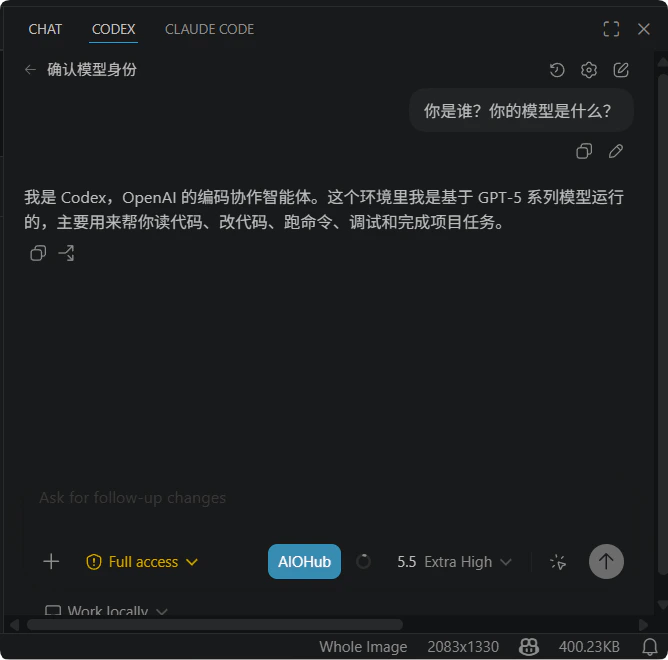
Restart VS Code and send a message in the Codex panel. A normal response confirms the setup works:
`base_url` must include `/v1`. Codex uses the OpenAI Responses API, which differs from Claude Code's endpoint.
Your API key's group determines which models are available and at what price. Recommended groups for Codex:
| Group | Notes |
| ------------------- | ---------------------------------- |
| `codex` | Gateway relay, compatibility-first |
| `codex-passthrough` | Direct pass-through, low latency |
See [Groups](/en/account/groups) for details.
Restart VS Code and send a message in the Codex panel. A normal response confirms the setup works:
 ***
## FAQ
Confirm VS Code version ≥ 1.90. Some extensions require a recent VS Code version. Restart VS Code and try again.
Confirm `ANTHROPIC_AUTH_TOKEN` is set and VS Code can read it. Run `echo $ANTHROPIC_AUTH_TOKEN` in the VS Code integrated terminal to verify.
Check that `base_url` in `~/.codex/config.toml` is `https://api.aiohub.org/v1` and the `AIOHUB_API_KEY` environment variable exists.
Yes. Claude Code and Codex use different protocols and configurations. They do not conflict and you can switch between them as needed.
Check your balance at [wallet management](https://api.aiohub.org/console/topup). See [Add funds](/en/account/recharge).
## Other editor extensions
If your editor extension supports a custom OpenAI Base URL (e.g., Continue, Cline), see [OpenAI-compatible apps](/en/clients/api-compatible).
***
## FAQ
Confirm VS Code version ≥ 1.90. Some extensions require a recent VS Code version. Restart VS Code and try again.
Confirm `ANTHROPIC_AUTH_TOKEN` is set and VS Code can read it. Run `echo $ANTHROPIC_AUTH_TOKEN` in the VS Code integrated terminal to verify.
Check that `base_url` in `~/.codex/config.toml` is `https://api.aiohub.org/v1` and the `AIOHUB_API_KEY` environment variable exists.
Yes. Claude Code and Codex use different protocols and configurations. They do not conflict and you can switch between them as needed.
Check your balance at [wallet management](https://api.aiohub.org/console/topup). See [Add funds](/en/account/recharge).
## Other editor extensions
If your editor extension supports a custom OpenAI Base URL (e.g., Continue, Cline), see [OpenAI-compatible apps](/en/clients/api-compatible).