

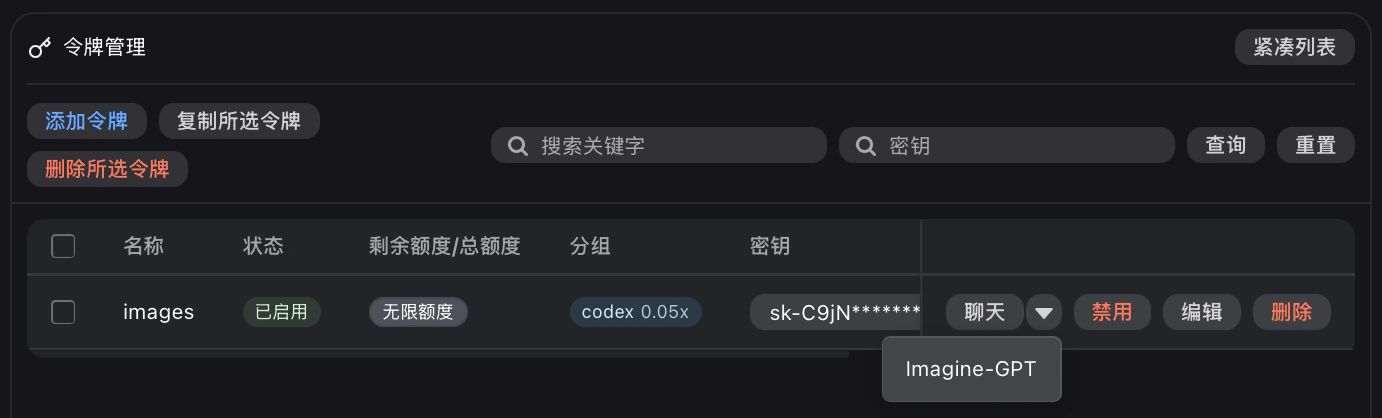
Imagine-GPT action on an image-enabled API key; AIOHub opens the playground with that key prefilled, so you do not need to paste the API key again.
Prerequisites
- An AIOHub API key
- A positive account balance
- An API key with at least one
openaiorcodex*group, such ascodexorcodex-passthrough, forgpt-image-2
Recommended values
| Setting | Value | Notes |
|---|---|---|
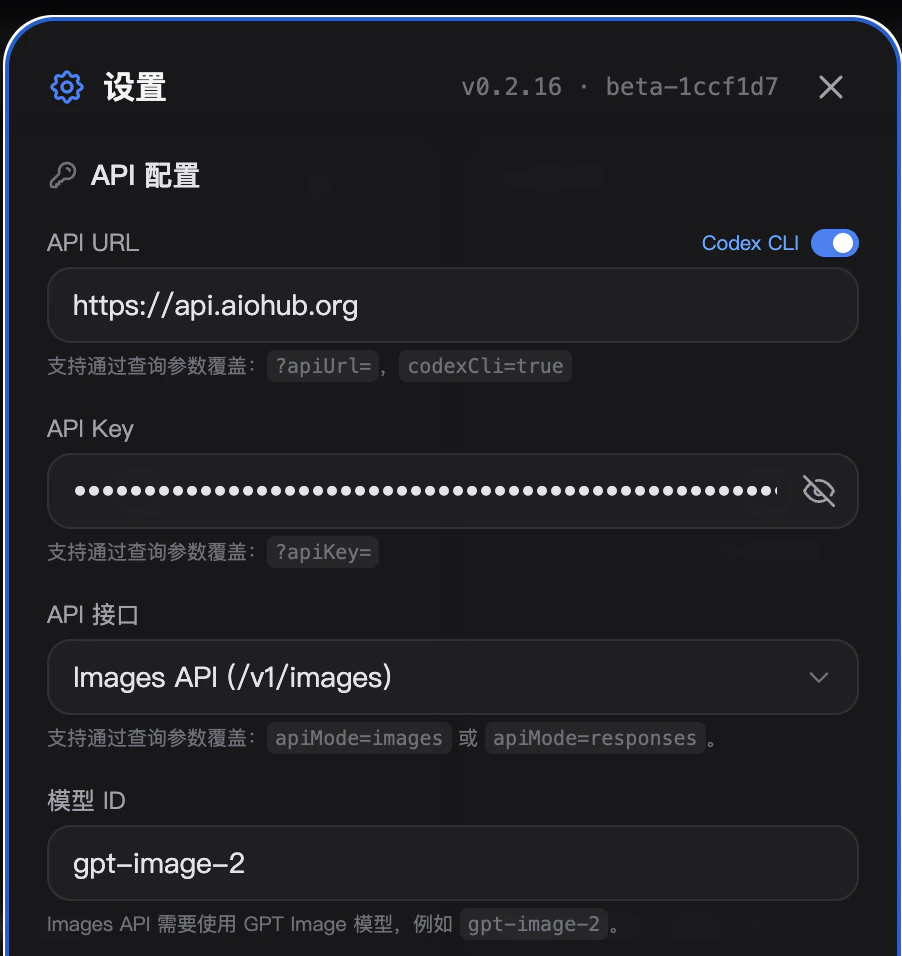
| App URL | https://imagine.aiohub.org/ | Open the playground in your browser |
| API URL | https://api.aiohub.org | Use the gateway root in this client |
| API Key | sk-your-api-key | Use a dedicated API key for this browser client |
| API interface | Images API (/v1/images) | Uses OpenAI Images generation and editing routes |
| Codex CLI | Enable for codex* groups; disable for the openai group | Match the switch to the API key group |
| Model ID | gpt-image-2 | The API key must include at least one openai or codex* group |
| Timeout | 360-600 seconds for large or high-quality jobs | Image generation can take longer than chat responses |
The Codex CLI switch depends on the API key group:
- API key in a
codexorcodex-passthroughgroup -> enable it - API key in the
openaigroup -> disable it
Setup
Open the playground
Visit https://imagine.aiohub.org/.
Or open from Token management
In the console token list, choose Imagine-GPT on the API key you want to use. This route opens the playground with the selected key already filled.
Open settings
In the top-right settings panel, configure the API URL, API key, API interface, Codex CLI switch, model ID, and timeout.
Use the AIOHub API URL
Set the API URL to
https://api.aiohub.org. Do not enter https://api.aiohub.org/v1/images/generations or https://api.aiohub.org/v1/images/edits; the playground appends the route itself when Images API is selected.Set the Codex CLI switch
- codex / codex-passthrough groups
- openai group
Enable Codex CLI.
codex* groups route requests through Codex channels and need this switch enabled.Choose a model
Set Model ID to
gpt-image-2. If the model is not visible, add an openai or codex* group to the API key in the console, then retry.Operational notes
- Browser settings and history are local to the browser. Use a dedicated API key, especially on shared devices.
- Usage, cost, and errors are recorded in the AIOHub console logs just like SDK requests.
- Model availability depends on the groups assigned to the API key. For
gpt-image-2, include at least oneopenaiorcodex*group. - Large image jobs can take several minutes. Increase the timeout before testing high-quality or high-resolution generations.
- If the browser cannot render a large response, check the console logs before retrying; the API request may already have completed.
Troubleshooting
401 or 403 errors
401 or 403 errors
Confirm the API key is valid, enabled, and sent as the full
sk- value. For 403 with gpt-image-2, check that the key includes an openai or codex* group, and confirm the Codex CLI switch matches the key group (codex* enabled, openai disabled).Model not found
Model not found
Request
/v1/models with the same API key or check the console model list. Select a model that is visible to that key.Route not found
Route not found
The API URL should be
https://api.aiohub.org in GPT Image Playground. Remove any full endpoint path from the API URL field.Generation times out
Generation times out
Increase the timeout to 360-600 seconds, reduce image size or quality, or try a different visible image model.
I am not sure whether Codex CLI should be on or off
I am not sure whether Codex CLI should be on or off
Check the group field in the token details page. If it includes
codex or codex-passthrough, enable the switch. If it includes openai, disable the switch. If the key includes both group types, either configuration can work.